Oil Prices Rise Amid Mixed Signals From U.S.-Iran Peace Talks
June 23, 2026
Oil Prices Rise Amid Mixed Signals From U.S.-Iran Peace Talks as Brent Crude Gains
June 24, 2026
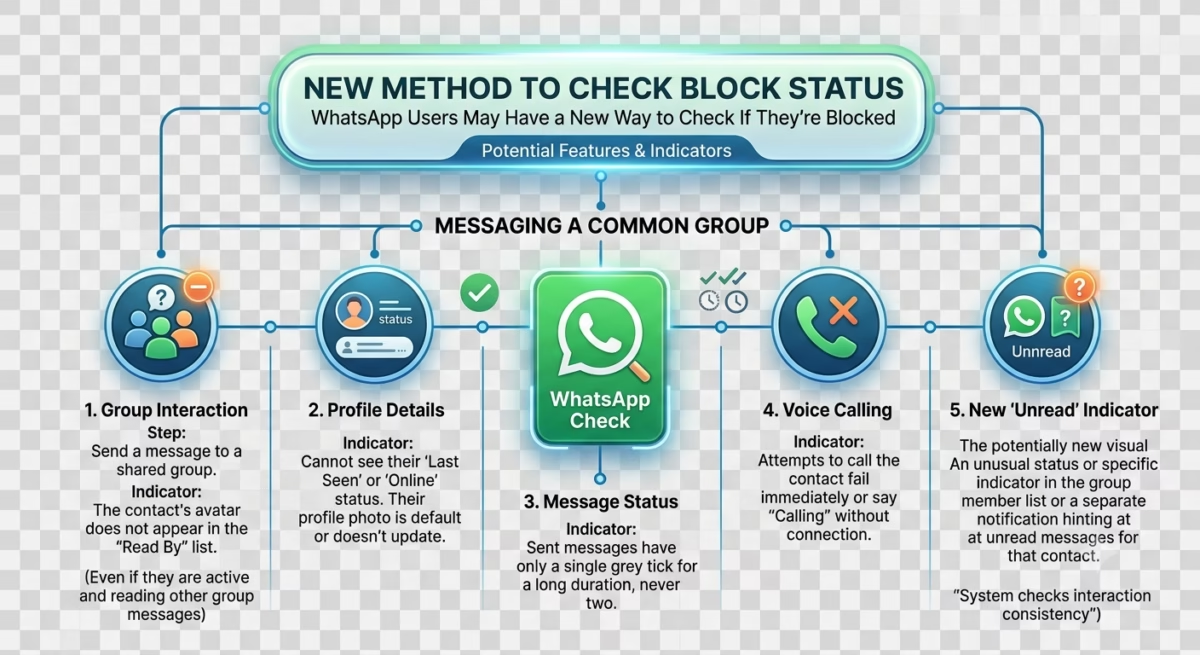
WhatsApp Users May Have a New Way to Check If They’re Blocked
WhatsApp continues to evolve its privacy and user experience features, and a recent report suggests that users may soon get a clearer way to understand whether they have been blocked by someone. Currently, WhatsApp does not directly notify users when they are blocked, which often leads to confusion and guesswork. The new update under discussion could make this situation more transparent.
At the moment, users rely on indirect signs such as missing profile pictures, no “last seen” status, or messages showing a single tick. However, these signs are not always accurate because privacy settings can also cause similar behavior.
The proposed changes aim to reduce confusion by making block status easier to interpret without violating user privacy.
Why WhatsApp Blocking Is Often Confusing
WhatsApp blocking is designed to protect privacy, but it often creates uncertainty. When someone blocks you, the app does not send a notification or clear warning. Instead, users have to look for subtle clues.
This can be confusing because many of these signals overlap with privacy settings. For example, someone may hide their profile photo or last seen without blocking you at all.
This is why many users search for ways to confirm whether they are blocked or not.
Common Signs Someone May Have Blocked You
Although WhatsApp does not officially confirm blocks, there are several common indicators users notice:
- You can no longer see the person’s profile picture
- Their “last seen” or online status disappears
- Messages only show one check mark (sent but not delivered)
- You cannot see updates to their “about” section
- Calls to that contact do not go through
However, none of these signs alone can guarantee that you are blocked. WhatsApp privacy settings can create the same effects.
Can You Still See Profile Picture If Someone Blocks You?
In most cases, if someone blocks you on WhatsApp, you will no longer be able to see their profile picture updates. However, if their privacy settings are set to limit visibility, you might also not see it even if you are not blocked.
This is why profile picture visibility is not a fully reliable method to confirm blocking.
Can You See “About” or Status After Being Blocked?
If someone blocks you, their “About” section and status updates usually disappear from your view. But again, privacy settings can also restrict this information.
So while missing “About” info may be a sign, it is not a guaranteed confirmation.
Why You Might Still See Online Status After Being Blocked
Some users report that they can still see online status even if they suspect they are blocked. This can happen due to:
- Temporary app sync issues
- Cached data on the device
- Privacy settings not fully updated
- Misinterpretation of online indicators
WhatsApp’s system is designed to protect privacy, so it does not always display consistent signals in real time.
What Is a WhatsApp Block Checker?
Many websites and apps claim to be “WhatsApp block checker tools,” but most of them are not reliable or official. WhatsApp does not provide any external tool or API that can confirm if someone has blocked you.
Users should be careful because these tools can be misleading or unsafe.
New Way WhatsApp May Improve Block Detection
According to recent reports, WhatsApp may introduce a more user-friendly way to understand blocking behavior. Instead of guessing based on indirect signs, users might get clearer in-app indicators.
However, WhatsApp is expected to balance this with privacy protection, meaning users will likely not receive a direct notification saying “you are blocked.”
The goal is to reduce confusion while maintaining user privacy and safety.
How to Know If Someone Blocked You (Current Method)
At present, the most reliable way to suspect a block is by observing multiple signs together:
- No profile picture visible
- Messages not delivering over time
- No last seen or online status
- Calls not connecting
Even then, WhatsApp does not guarantee confirmation.
Conclusion
WhatsApp blocking remains a privacy-focused feature that intentionally avoids direct notifications. While users may soon get a clearer way to understand blocking behavior, the app is unlikely to reveal exact block status directly.
For now, users must rely on indirect signs, but should also remember that privacy settings can often mimic blocking behavior, making full confirmation difficult.
FAQs
If someone blocked you on WhatsApp can you see their name?
Yes, their name may still appear in your chat list or contacts even if they block you.
Can you see profile picture if someone blocked you on WhatsApp?
Usually no, but it can also be hidden due to privacy settings.
When someone blocks you on WhatsApp can you see their about?
No, the “About” section typically disappears after blocking, but it may also be hidden by privacy settings.
How to know if someone blocked you on WhatsApp?
Look for multiple signs like missing profile picture, undelivered messages, and no last seen status.
Can I check WhatsApp block status using an app or tool?
No official tool exists, and third-party block checker apps are not reliable.
Why can I still see online status if someone blocked me?
It may be due to app delays, cached data, or misunderstanding of privacy settings.
Elevate Your Brand with MasterInDesign 🚀
Don’t let your business get left behind in today’s fast-paced digital world. At MasterInDesign, we specialize in helping brands stand out, engage audiences, and grow online.
Take the next step toward digital excellence. Contact us today and transform your brand into a powerful online