Gold and Silver Prices in Pakistan Today, 15th May, 2026 – Latest Rates Per Tola & Gram
May 15, 2026
PSX Loses 2,000 Points in Intraday Trade as Bearish Momentum Persists
May 18, 2026
Operation SilentCanvas: Attackers Use .JPEG Files to Deliver Malware
Introduction
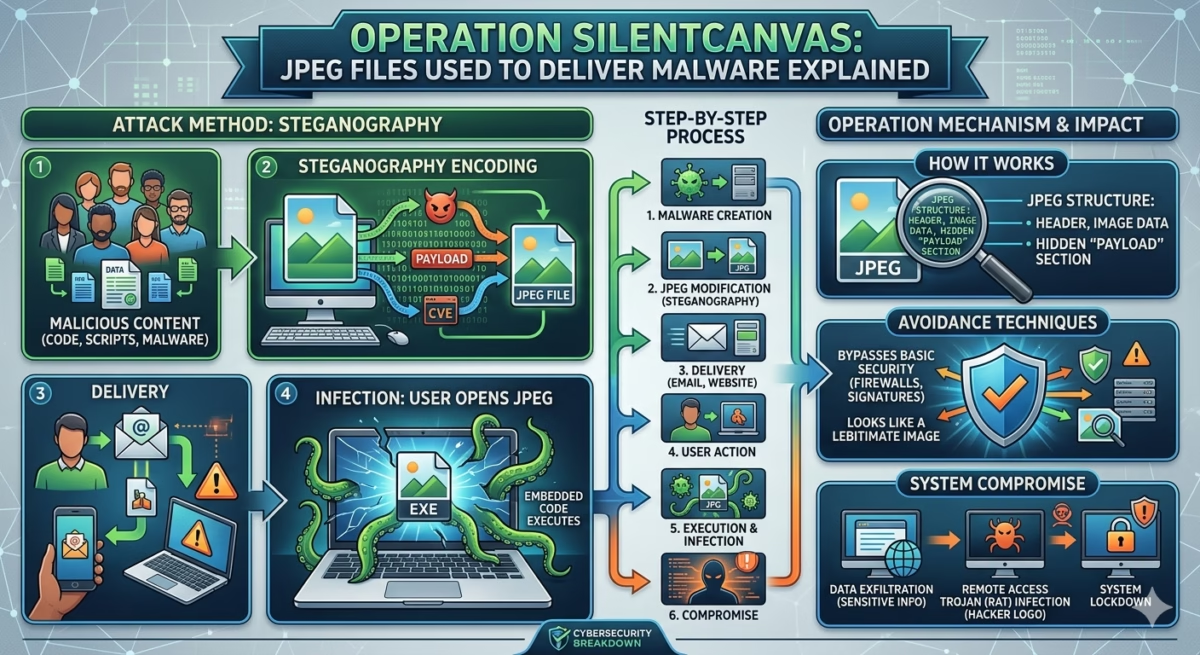
Cybersecurity researchers have uncovered a new malware campaign known as “Operation SilentCanvas,” where attackers reportedly use seemingly harmless JPEG image files to deliver malicious payloads. The campaign highlights how cybercriminals are increasingly exploiting trusted file formats to bypass security systems and deceive users.
Image files such as JPG and JPEG are commonly viewed as safe because they are associated with photos and graphics rather than executable software. However, security experts warn that attackers are finding creative ways to abuse these file types for malware delivery, phishing operations, and hidden cyberattacks.
The discovery of Operation SilentCanvas raises concerns about evolving cybersecurity threats and the growing sophistication of modern malware techniques.
What Is Operation SilentCanvas?
Operation SilentCanvas is a cyberattack campaign that allegedly uses manipulated JPEG files as part of a malware distribution strategy.
According to cybersecurity researchers, attackers are leveraging image-based techniques to:
- Hide malicious code
- Evade traditional antivirus detection
- Trick users into opening infected files
- Deliver malware payloads silently
- Conduct espionage or data theft operations
The campaign demonstrates how attackers continue adapting their methods to exploit trust in everyday digital content.
How JPEG Malware Attacks Work
JPEG files themselves are not typically executable programs. However, attackers can manipulate files or exploit vulnerabilities to turn images into part of a cyberattack chain.
Common Techniques Include:
1. Embedded Malicious Code
Cybercriminals may hide encoded scripts or malware components inside image files.
The malicious content may later be extracted or executed through:
- Vulnerable software
- Malicious scripts
- Exploited applications
- Fake image viewers
2. Steganography Attacks
Steganography is a technique that hides data inside seemingly normal files such as images, audio, or videos.
In malware campaigns, attackers may:
- Conceal commands inside JPEG files
- Hide malware instructions within image pixels
- Communicate with infected systems secretly
Because the image still appears normal, the hidden content may avoid detection.
3. Phishing Delivery
Attackers may send infected JPEG files through:
- Email attachments
- Messaging platforms
- Fake downloads
- Social engineering campaigns
Victims often trust image files more than executable files, making them effective tools for deception.
Why JPEG-Based Attacks Are Dangerous
Image-based malware attacks are particularly concerning because they exploit user trust and security blind spots.
Key Risks Include:
- Harder detection by traditional antivirus systems
- Increased success in phishing campaigns
- Hidden communication between attackers and infected devices
- Greater potential for stealth operations
Many users assume image files are harmless, which increases the effectiveness of these attacks.
Can Malware Really Be Embedded in JPG Files?
One of the most common cybersecurity questions is whether malware can actually exist inside JPG or JPEG files.
The answer is more complex than a simple yes or no.
Important Clarification:
A JPEG image alone usually cannot directly execute malware like a traditional program. However, attackers can:
- Exploit vulnerabilities in software that processes images
- Hide malicious data within image files
- Use scripts that extract malware from images
- Combine images with infected archives or documents
This means JPEG files can become part of a broader attack strategy.
JPEG Compression and Security Concerns
Some discussions surrounding “JPEG compression attacks” relate to how image processing systems handle compressed data.
Attackers may attempt to exploit:
- Weaknesses in image decoding software
- Buffer overflow vulnerabilities
- Outdated image libraries
- Poorly secured applications
If vulnerable software incorrectly processes a malicious image, it could potentially allow unauthorized code execution.
This is why software updates and security patches are critical.
Social Engineering Plays a Major Role
Operation SilentCanvas also highlights the importance of social engineering in modern cybercrime.
Attackers often rely on:
- Curiosity
- Fear
- Urgency
- Fake trust signals
Users may receive:
- Fake invoices
- Event photos
- Social media images
- Business-related graphics
Once victims interact with malicious content, attackers attempt to gain access to systems or sensitive information.
How Cybercriminals Evade Detection
Modern malware campaigns increasingly focus on stealth and evasion.
JPEG-based attacks can help attackers:
- Blend into normal network traffic
- Avoid suspicious file-type warnings
- Bypass weak email filters
- Conceal malicious communication
This makes detection more difficult for organizations relying solely on traditional security methods.
The Growing Use of Steganography in Cybercrime
Steganography has become more common in advanced cyberattacks because it allows attackers to hide information inside ordinary files.
Cybercriminals may use image-based steganography for:
- Command-and-control communication
- Data exfiltration
- Malware updates
- Hidden instructions for infected systems
Because the files appear legitimate, suspicious activity may go unnoticed for long periods.
How to Protect Against JPEG Malware Attacks
Cybersecurity experts recommend several important safety measures.
1. Keep Software Updated
Regularly update:
- Operating systems
- Browsers
- Image viewers
- Antivirus software
Security patches help fix vulnerabilities that attackers may exploit.
2. Avoid Suspicious Attachments
Do not open image files from:
- Unknown senders
- Unexpected emails
- Suspicious websites
- Unverified downloads
Even harmless-looking files can be dangerous.
3. Use Advanced Security Tools
Modern cybersecurity solutions often include:
- Behavioral analysis
- AI-based threat detection
- Sandboxing technologies
- Network monitoring systems
These tools can help identify unusual activity beyond simple file scanning.
4. Educate Users About Phishing
Human error remains one of the biggest cybersecurity risks.
Organizations should train employees to:
- Recognize phishing attempts
- Verify suspicious messages
- Avoid unknown attachments
- Report unusual activity immediately
Why These Attacks Are Increasing
Cybercriminals are constantly searching for new ways to bypass security systems.
Image-based malware campaigns are increasing because:
- Users trust image files
- Traditional defenses may overlook them
- Advanced attackers prefer stealth methods
- Social engineering remains highly effective
As cybersecurity improves, attackers adapt with more creative techniques.
The Future of Malware Delivery Techniques
Operation SilentCanvas reflects a broader trend toward sophisticated and unconventional cyberattack methods.
Future malware campaigns may increasingly involve:
- Multimedia file abuse
- AI-assisted phishing
- Hidden payload delivery
- Fileless malware attacks
- Cloud-based attack strategies
Security experts warn that organizations must evolve defenses continuously to keep pace with changing threats.
Conclusion
Operation SilentCanvas demonstrates how cybercriminals are using trusted file formats like JPEG images as part of sophisticated malware delivery campaigns. By exploiting user trust, software vulnerabilities, and hidden data techniques, attackers can launch stealthy cyberattacks that are harder to detect.
Although JPEG files themselves are not inherently dangerous, manipulated images can become part of complex attack chains involving phishing, steganography, and malware deployment.
As cyber threats continue evolving, both individuals and organizations must remain cautious when handling digital files—even those that appear completely harmless.
FAQs
1. Can malware really be hidden inside JPEG files?
Yes, attackers can hide malicious data or scripts inside image files using techniques like steganography or software exploitation.
2. Are JPG files dangerous by themselves?
Normally, JPG files are safe, but manipulated images combined with software vulnerabilities or malicious scripts can become part of cyberattacks.
3. What is steganography in cybersecurity?
Steganography is a method of hiding secret data inside ordinary files such as images, audio, or videos.
4. How can users protect themselves from image-based malware?
Users should avoid suspicious attachments, keep software updated, and use reliable cybersecurity tools.
5. Why are attackers using image files for malware delivery?
Image files are trusted by users and can sometimes bypass traditional security systems, making them effective tools for cybercriminals.