PSX Loses 2,000 Points in Intraday Trade as Bearish Momentum Persists
May 18, 2026
Top Stories: iPhone 18 Pro Rumors and iOS 26.5 Update Highlights
May 18, 2026
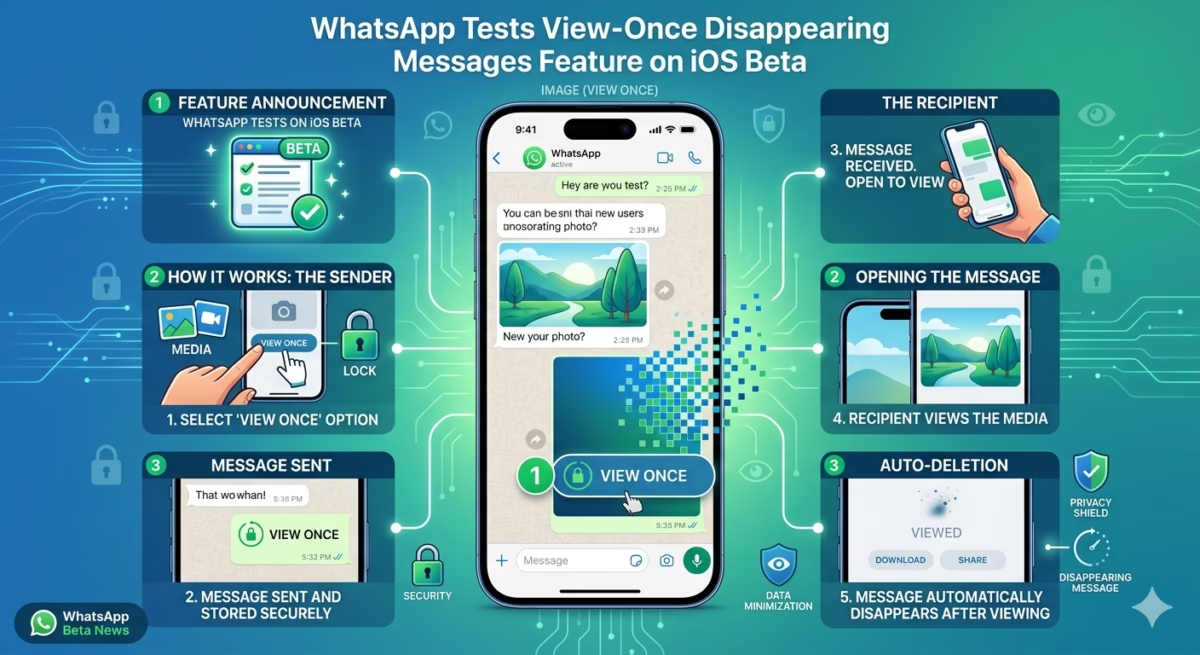
WhatsApp is now testing the View-Once disappearing messages feature on iOS
Introduction
WhatsApp is reportedly rolling out a new privacy-focused update for iOS beta users that expands its View Once and disappearing messages system. The feature is currently being tested through the iOS beta program and is designed to give users more control over how long their messages remain visible after being read.
This update is part of WhatsApp’s broader push toward stronger privacy tools and more flexible message expiration settings.
What is the new View-Once / disappearing messages update?
The feature builds on WhatsApp’s existing View Once system, where photos, videos, and voice messages disappear after being opened.
Now, WhatsApp is testing an enhanced version that introduces:
- Messages that disappear after being read
- A new “After reading” style timer option
- Automatic deletion of unread messages after a fixed time
- More flexible disappearing message controls
This means messages may no longer just expire based on time sent—but instead based on when they are actually viewed.
How the feature works
According to beta testing reports, the system adds a new control inside disappearing message settings.
Key behavior includes:
- If a message is read → it disappears after a short set time
- If a message is not read → it may still expire automatically (e.g., after 24 hours)
- Users can manage disappearing settings per chat
- The feature is optional and must be manually enabled
This gives users more precise control compared to standard timers.
Why WhatsApp is adding this feature
WhatsApp is focusing heavily on privacy and message control as competition increases from other messaging platforms.
The update aims to:
- Improve user privacy
- Reduce permanent chat storage
- Give users more control over sensitive conversations
- Compete with advanced messaging apps offering self-destructing chats
It also aligns with Meta’s broader push for encrypted and temporary messaging features.
View Once vs Disappearing Messages
WhatsApp already offers two similar privacy tools:
View Once
- Media (photos/videos) disappears after a single view
- Cannot be reopened normally
Disappearing Messages
- Entire chats or messages disappear after a set time (24h, 7d, 90d)
New feature adds:
- Deletion based on “after reading” behavior
- More dynamic message expiration rules
Availability
The feature is currently:
- Available only to selected iOS beta users
- Rolling out through TestFlight testing
- Still under development with limited availability
A full public release date has not been confirmed.
Related WhatsApp beta features
Alongside this update, WhatsApp is also testing other features in beta versions, such as:
- Improved disappearing message controls
- Privacy enhancements for chats
- Experimental AI and interface updates
- Feature testing for both Android and iOS users
Impact on users
If fully released, this update could change how people use WhatsApp by:
- Making conversations more temporary
- Increasing privacy in personal and business chats
- Reducing long-term chat history storage
- Changing how users share sensitive information
However, it may also make it harder to retrieve important messages later.
Conclusion
WhatsApp’s new View Once and disappearing messages testing on iOS shows the platform’s continued focus on privacy and message control. By introducing “after reading” style deletion and more flexible expiration options, WhatsApp is moving toward a more dynamic and privacy-first messaging experience.
While still in beta, the feature could significantly reshape how users manage conversations in the future.
FAQs
1. What is WhatsApp View Once feature?
It allows photos, videos, and messages to disappear after being viewed once.
2. What is new in the iOS beta update?
WhatsApp is testing messages that disappear after being read, not just after a fixed time.
3. Is this feature available to everyone?
No, it is currently limited to iOS beta testers only.
4. Can users turn it off?
Yes, the feature is optional and must be enabled manually.
5. When will it be released publicly?
There is no official release date yet.
Don’t Miss the Next Big Update
Get the Latest Tech Alerts Instantly Master in Design delivers real-time updates on mobile apps, AI, and digital trends.
If you love fast, accurate tech news — you’re in the right place.