WHO Recommends New Diagnostic Tools to End Tuberculosis | TB Diagnosis Updates 2026
March 27, 2026
Oil Prices Jump as Iran War Rounds One Month | U.S. Markets Open Higher
March 30, 2026
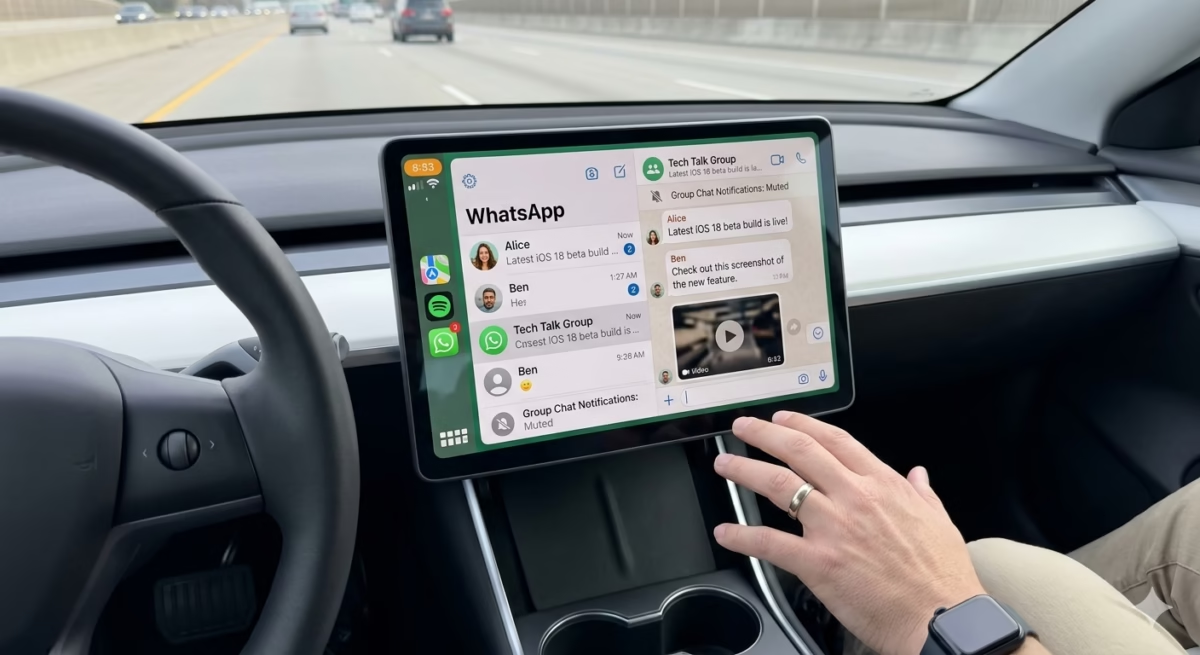
WhatsApp Beta Brings Full Messaging to CarPlay Interface
The world of mobile messaging is constantly evolving, and WhatsApp continues to be at the forefront of innovations aimed at improving user experience. The latest update in WhatsApp’s beta program has made waves among iOS users by introducing full messaging capabilities to the CarPlay interface. This feature is set to revolutionize how drivers interact with their messages, offering a safer and more efficient experience on the road.
What is WhatsApp Beta?
WhatsApp Beta is a testing program designed for users who want early access to upcoming features before they are released to the general public. By joining the beta program, users can explore new functionalities, provide feedback, and help improve the overall app experience. This approach allows WhatsApp to refine updates and ensure a smoother rollout when features are made available in the stable version of the app.
Beta testers often receive updates more frequently than regular users, giving them a glimpse into features that could redefine the way we communicate. For iOS users, this means early access to features like the CarPlay integration, improved chat management, and advanced media sharing capabilities.
WhatsApp Beta for CarPlay: What’s New?
Apple CarPlay is a system that allows iPhone users to display and control apps on their car’s infotainment system. Previously, WhatsApp’s functionality on CarPlay was limited to basic voice commands and notifications. Users could listen to messages via Siri but had minimal control over sending or reading messages.
With the new WhatsApp beta update, full messaging functionality is now available directly on the CarPlay interface. This includes:
- Reading and Sending Messages: Users can now read incoming messages on the CarPlay screen and respond either by typing using a virtual keyboard or using voice dictation via Siri.
- Group Chat Support: The update supports group conversations, allowing drivers to stay connected with friends, family, and colleagues without needing to pick up their phones.
- Media Sharing: Sending photos, voice notes, and emojis is now possible directly through CarPlay, making the messaging experience more interactive and complete.
- Enhanced Notifications: CarPlay now displays richer notifications from WhatsApp, showing more context and content from incoming messages.
Benefits of Using WhatsApp on CarPlay
Integrating full WhatsApp functionality with CarPlay offers several benefits:
- Safer Driving: By minimizing the need to touch your phone while driving, the risk of accidents caused by distracted driving is reduced. Voice commands and on-screen prompts make interaction simple and hands-free.
- Seamless Communication: Users no longer need to wait until reaching their destination to respond to messages. This is particularly beneficial for professionals who need to stay in touch while on the move.
- Efficiency: Quick access to messages, media, and group chats saves time and streamlines communication without compromising safety.
- Integration with iOS Ecosystem: Since CarPlay is deeply integrated with iOS, WhatsApp’s beta update ensures a smooth and responsive user experience across devices.
How to Join WhatsApp Beta Program
For those interested in exploring WhatsApp’s latest features, joining the beta program is the first step. Here’s how iOS and Android users can join:
iOS Users
- Open the TestFlight app on your iPhone. This app allows users to test beta versions of apps.
- Find WhatsApp Beta in TestFlight and click Join.
- Follow the instructions to download the latest beta version of WhatsApp.
- Once installed, you’ll automatically receive beta updates as they are released.
Android Users
- Open the Google Play Store and search for WhatsApp.
- Scroll down to the section labeled Join Beta Program.
- Tap Join and wait for confirmation.
- After joining, update WhatsApp to the beta version to access new features.
Note: Sometimes, beta programs have limited slots. If the program is full, users can try again later, as spots may open up when existing testers leave the program.
WhatsApp Beta iOS vs Android
While both iOS and Android beta programs offer early access to new features, there are some differences:
- iOS Beta: Uses Apple TestFlight to distribute beta updates. This program usually has stricter limits on the number of participants.
- Android Beta: Managed through Google Play, often allowing more participants to join compared to iOS.
Despite these differences, both platforms aim to provide early access to exciting features like CarPlay messaging, enhanced group chat management, and new media options.
WhatsApp Beta Latest Version Features
The latest WhatsApp beta version not only brings CarPlay messaging but also introduces several other improvements:
- Improved Privacy Controls: Users can manage who sees their online status and last seen timestamps.
- Reaction Emojis: React to messages without sending a separate reply, keeping chats clean and organized.
- Advanced Media Editing: Edit images and videos before sending them in chats.
- Multi-Device Support: Sync WhatsApp across multiple devices without needing your phone to be constantly online.
How to Update WhatsApp Beta
To enjoy the latest features, users should ensure they have the latest beta version installed:
- iOS Users: Open TestFlight, select WhatsApp Beta, and click Update.
- Android Users: Open Google Play Store, go to WhatsApp, and tap Update under the beta program section.
Regular updates ensure you have the newest features and bug fixes, improving overall performance and security.
FAQs About WhatsApp Beta CarPlay Integration
Q1: Is WhatsApp CarPlay messaging safe while driving?
A1: Yes. The feature is designed to minimize distractions. Voice commands and on-screen controls allow for hands-free communication, reducing the risk of accidents.
Q2: Can I send images and voice notes through CarPlay?
A2: Yes. The beta update supports sending photos, emojis, and voice notes directly from the CarPlay interface.
Q3: Is the WhatsApp beta program free to join?
A3: Yes, joining WhatsApp Beta is free on both iOS and Android, though availability may be limited.
Q4: What should I do if the beta program is full?
A4: You can periodically check the beta program page. Slots may open as existing testers leave, or you can try joining at a later date.
Q5: Will these features be available in the stable WhatsApp version?
A5: Typically, features tested in beta are rolled out to the stable version after refinement and feedback from testers.
Elevate Your Brand with MasterInDesign 🚀
Don’t let your business get left behind in today’s fast-paced digital world. At MasterInDesign, we specialize in helping brands stand out, engage audiences, and grow online.
Take the next step toward digital excellence. Contact us today and transform your brand into a powerful onlin