Instagram Denies Data Breach as Password Reset Emails Alarm Users
January 12, 2026
Oil Prices Rally on Geopolitical Risks and Supply Disruptions
January 13, 2026
Get Ready for Gmail’s ‘AI Inbox’ as Google Pushes Next‑Generation Email Intelligence
Google is preparing to roll out a major update to its flagship email platform, introducing an AI Inbox designed to transform how users read, write and engage with messages in their Gmail account. Branded internally as Gmail AI Inbox, the feature promises to blend advanced artificial intelligence with everyday email tasks, offering deeper search capabilities, smarter categorization, intuitive writing assistance and next‑level productivity tools powered by generative models.
According to sources familiar with developments, the AI Inbox will leverage Google’s most recent AI models — including a version of Gemini — to power real‑time assistance features. This marks a significant step toward integrating AI directly into one of the world’s most widely used communication platforms, a move that could reshape expectations for email software in the years ahead.
What Is the Gmail AI Inbox?
At its core, the Gmail AI Inbox seeks to make email more conversational, contextually aware and easier to manage. The feature set is expected to include:
- Smart summaries: AI‑generated synopses of long email threads to quickly bring users up to speed.
- Contextual replies: Suggested responses based on conversation history and tone.
- Priority insights: AI evaluation of message importance to surface key emails.
- Advanced search: Gmail AI search that understands intent, not just keywords.
Rather than replacing traditional inbox functions, the AI Inbox will layer intelligent assistance on top of existing tools, helping users spend less time navigating messages and more time acting on what matters.
Why This Matters Now
Email remains a backbone of personal and professional communication. For many users, managing an overflowing inbox — flagged as urgent here, buried deep there — has become a daily grind. Google’s new approach aims to reduce friction by weaving AI deeply into the user experience, helping users to not just read, but understand and engage with their email faster and more efficiently.
Executives at Google have emphasized that AI features like the Inbox are not just cosmetic enhancements; they are intended to fundamentally shift how people interact with messaging platforms. By combining machine reasoning with user needs, Google aims to deliver more proactive and personalized tools within email itself.
Behind the Scenes: AI Technology and Gemini
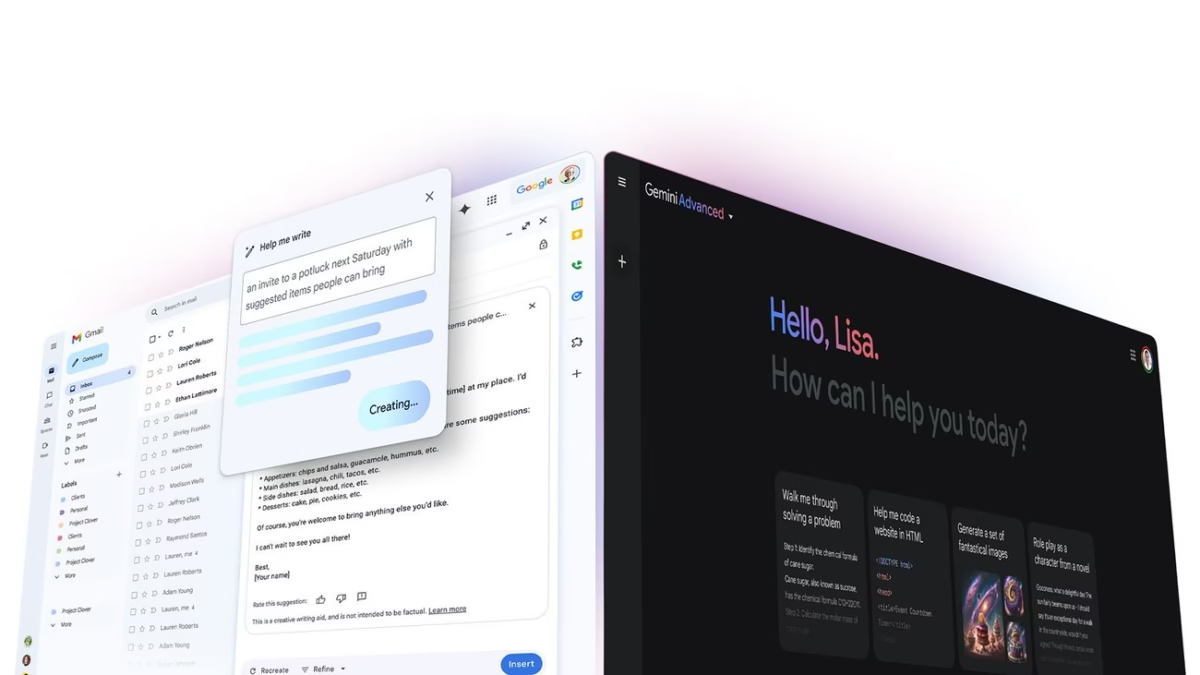
Much of the Gmail AI Inbox’s capabilities are rooted in Google’s broader AI strategy, including integration with the Gemini family of models. Internally referred to as Gmail Gemini AI, this integration is designed to harness advanced language understanding and generation while respecting user privacy and data security.
Users who adopt the AI Inbox can expect features such as content drafting, tone refinement, and contextual suggestions that go beyond simple autocomplete. For example, a meeting summary can be transformed into a concise action list; a long thread of technical feedback can be distilled into clear recommendations.
Google has also emphasized that users will retain control. Intentional prompts and safeguards are part of the experience, with transparency about when AI is engaged and how it is applied.
How to Enable Gemini in Gmail and Use AI Tools
As rollout begins, many users will wonder how to enable Gemini in Gmail. The feature will be available through the regular Gmail login interface or via the Gmail mobile app, appearing as options within the inbox and compose windows.
From initial previews, activation is expected to be straightforward: users will either opt‑in through a prompt after signing into their Gmail account or toggle AI features in settings under a new “AI tools” section. Once enabled, prompts like “Help me write in Gmail AI” or quick suggestions in the compose area will become available. These tools can assist with generating replies, drafting original content, refining tone, or even suggesting edits based on style preferences.
Examples of How Users Will Benefit
Here are some practical ways the Gmail AI Inbox will enhance email tasks:
1. Writing Faster and Better
When composing messages, users can type a basic idea and ask the AI for help. With commands like “help me write in Gmail AI,” users can generate full professional replies, casual responses, or creative messages suited to tone and intent.
2. Searching Smarter
Rather than relying on exact keywords, the Gmail AI Inbox search feature understands context. Simple queries like “find the email where they confirmed the budget” or “show me the latest contract attached” can yield accurate results without perfect phrasing.
3. Summarizing Conversations
AI tools can analyze thread history and produce concise summaries. This means no more scrolling endlessly to find key points — the AI highlights them for you.
4. Managing Priorities
The AI Inbox assesses message importance based on context, sender history and project relevance. Important messages are prioritized, while less urgent ones are grouped for batch review.
User Expectations and Beta Testing
As with any major deployment, Google is expected to release the Gmail AI Inbox in phases. Early access and beta testing may be available to select users or enterprise customers first. Feedback from these users will shape refinements, performance improvements, and additional capabilities.
Google has signaled that AI tools should feel intuitive rather than intrusive. The goal is to enhance productivity without overwhelming users with complexity. Most AI features will appear contextually — activated where beneficial and hidden when not needed.
Privacy and Security Considerations
With generative AI handling sensitive communication, privacy remains a core concern. Google’s privacy policies emphasize that AI processing will occur securely, with data usage governed by user agreements. Explicit disclosures, encrypted transmission, and user control over AI activity are part of Google’s framework.
For businesses, integration with enterprise security protocols ensures that email intelligence adheres to organizational standards. Users will be able to manage what AI can access and how long suggestions are stored.
How This Compares to Other Email AI Efforts
Email services from competitors have begun experimenting with AI features, but Google’s approach with the AI Inbox is among the most ambitious. The combination of a large user base, deep integration with productivity tools, and advanced language models positions Gmail to set a high standard for intelligent email platforms.
Users curious whether similar tools exist elsewhere will find comparable features in other services, but Google’s fusion of AI, search capability, and contextual understanding is expected to stand out.
Looking Ahead: The Future of Email with AI
The launch of the Gmail AI Inbox signals a significant step toward the future of digital communication. As AI becomes more integrated with daily tasks, email — a decades‑old tool — is set to become more adaptive, intelligent and user‑centric.
Early adopters and productivity enthusiasts will likely welcome the change. Meanwhile, everyday users will discover that managing messages, drafting replies and finding important information can feel simpler and more efficient than ever.
With features like Gmail AI search, enhanced writing tools and smart summarization, Gmail’s AI Inbox is poised to redefine how billions of users interact with their email each day.
FAQ — Gmail AI Inbox
1. What is Gmail’s AI Inbox?
Gmail’s AI Inbox is a new feature that integrates Google’s Gemini AI into your Gmail account. It provides smart summaries, contextual replies, advanced search, and AI-generated content to improve email productivity.
2. How do I enable Gmail AI Inbox?
You can enable the AI Inbox through your Gmail login. Look for the AI or Gemini options in settings under “AI tools” or follow on-screen prompts when the feature is available.
3. What is Gmail Gemini AI?
Gmail Gemini AI is Google’s generative AI technology integrated into Gmail. It helps summarize emails, suggest replies, draft messages, and perform context-based Gmail AI search.
Elevate Your Brand with MasterInDesign 🚀
Don’t let your business get left behind in today’s fast-paced digital world. At MasterInDesign, we specialize in helping brands stand out, engage audiences, and grow online.
Take the next step toward digital excellence. Contact us today and transform your brand into a powerful online