Oil Prices Advance as Stocks Fall on US-Iran Deadlock and Market Uncertainty
May 14, 2026
Gold and Silver Prices in Pakistan Today, 15th May, 2026 – Latest Rates Per Tola & Gram
May 15, 2026
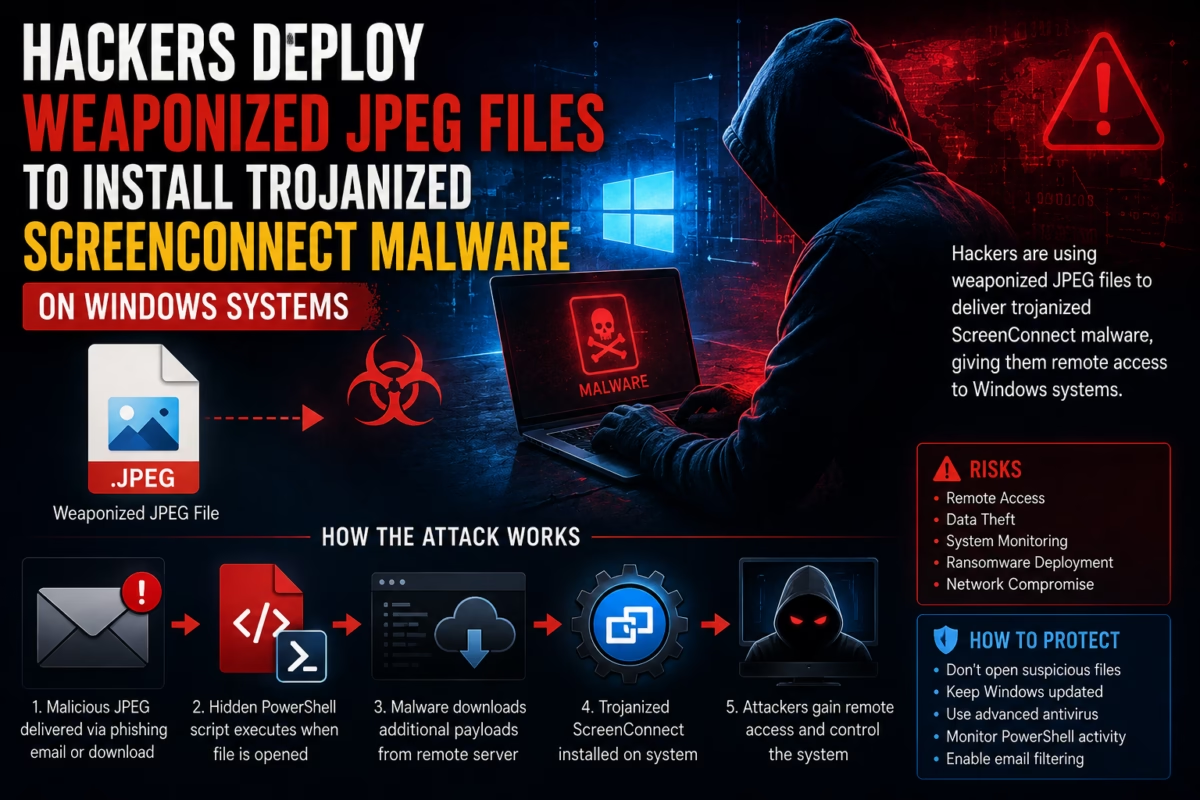
Hackers Deploy Weaponized JPEG Files to Install Trojanized ScreenConnect Malware on Windows Systems
Cybersecurity researchers have uncovered a dangerous new malware campaign where hackers are using weaponized JPEG image files to silently infect Windows computers with trojanized ScreenConnect malware.
The campaign demonstrates how cybercriminals are increasingly hiding malicious code inside files that appear completely harmless. By disguising malware as standard image files, attackers can bypass traditional security systems and trick users into opening infected attachments.
Security experts warn that this attack highlights a growing trend in modern cybercrime where trusted file formats and legitimate remote access tools are abused to gain unauthorized control of devices.
What Is a Weaponized JPEG File?
A weaponized JPEG file looks like a normal image but secretly contains malicious code designed to infect a system.
Instead of displaying a harmless picture, the file can:
- Execute hidden scripts
- Download malware
- Install remote access tools
- Steal data
- Give hackers system control
Because JPEG files are commonly shared online, users are less likely to suspect them.
How the Malware Attack Works
The infection process happens in multiple stages.
1. Fake JPEG Delivery
Victims receive a file disguised as:
- An image attachment
- A software update
- A shared photo
- A downloaded media file
The file usually carries a “.jpeg” extension to appear legitimate.
2. Hidden PowerShell Execution
Once the file is opened, hidden PowerShell commands execute silently in the background.
The script may:
- Create hidden folders
- Disable security protections
- Download additional malware
- Connect to attacker-controlled servers
This stage allows hackers to prepare the system for deeper compromise.
3. Trojanized ScreenConnect Installation
The malware then installs a modified version of ScreenConnect, a legitimate remote access and IT management tool.
The trojanized version gives attackers:
- Full remote desktop access
- File transfer capabilities
- Credential theft access
- Persistent system control
- Surveillance abilities
Because ScreenConnect is normally trusted software, it can help attackers evade detection.
Why Hackers Use Legitimate Tools
Cybercriminals increasingly abuse legitimate software because:
- Security systems trust well-known tools
- Antivirus programs may ignore signed applications
- Remote management software blends into normal activity
- Detection becomes more difficult
This strategy is known as “living off the land” in cybersecurity.
Why JPEG-Based Malware Is Dangerous
Image files are usually considered safe by average users.
Attackers exploit this trust because:
- People frequently open images without hesitation
- Email filters may allow image attachments
- Social engineering becomes easier
- Malware can bypass suspicion
This makes weaponized image files highly effective in phishing campaigns.
Main Targets of the Campaign
Researchers believe the malware campaign mainly targets:
- Businesses
- Corporate Windows systems
- IT administrators
- Remote workers
- Organizations using remote management tools
Attackers often focus on systems with valuable credentials and sensitive business data.
Risks of Trojanized ScreenConnect Malware
Once attackers gain remote access, they can:
- Monitor screens
- Record activity
- Steal passwords
- Deploy ransomware
- Move through corporate networks
- Exfiltrate sensitive files
The malware may remain hidden for long periods before detection.
Signs Your Windows System May Be Infected
Potential warning signs include:
- Unusual background PowerShell activity
- Unexpected remote access sessions
- Slower system performance
- Unknown processes running
- Antivirus alerts
- Strange network traffic
However, advanced malware often hides its activity effectively.
How Hackers Evade Detection
The campaign uses several advanced evasion techniques.
1. Obfuscated Scripts
PowerShell commands are heavily hidden and encoded to avoid detection.
2. Fileless Malware Techniques
Some stages run directly in memory without creating obvious files on disk.
3. Trusted Software Abuse
Using legitimate remote management tools helps malware blend into normal enterprise environments.
4. Multi-Stage Payloads
The attack unfolds gradually, reducing immediate suspicion.
Why Windows Systems Are Common Targets
Windows remains the world’s most widely used desktop operating system, making it the primary target for cybercriminals.
Attackers prefer Windows because:
- Large enterprise adoption
- Extensive software ecosystem
- Higher attack surface
- Valuable business data
Most corporate infrastructures still rely heavily on Windows environments.
Growing Trend of Malware Hidden in Media Files
Cybersecurity experts say hackers are increasingly using:
- Images
- PDFs
- Office documents
- Videos
- Archive files
to distribute malware.
These attacks rely heavily on user trust and social engineering rather than traditional hacking alone.
How to Protect Against Weaponized JPEG Malware
Users and organizations can reduce risk by following security best practices.
1. Avoid Opening Suspicious Attachments
Never open image files from unknown or untrusted sources.
2. Disable Unnecessary Script Execution
Restrict PowerShell usage where possible.
3. Use Advanced Endpoint Protection
Modern security tools can detect suspicious script behavior.
4. Keep Systems Updated
Regular updates help patch vulnerabilities attackers may exploit.
5. Monitor Remote Access Tools
Organizations should carefully audit remote management software usage.
Importance of Cybersecurity Awareness
Human error remains one of the biggest causes of malware infections.
Training employees to recognize:
- Phishing emails
- Suspicious attachments
- Fake downloads
- Social engineering tactics
can significantly reduce attack success rates.
Impact on Businesses
Malware attacks involving remote access tools can lead to:
- Financial losses
- Data breaches
- Operational disruption
- Reputation damage
- Regulatory penalties
Organizations increasingly face sophisticated cyber threats targeting critical systems.
Future of Malware Attacks
Security experts believe malware campaigns will continue evolving with:
- AI-assisted phishing
- More advanced evasion methods
- Fileless malware techniques
- Trusted software abuse
- Multi-platform targeting
Attackers are constantly adapting to bypass traditional defenses.
FAQs
Q1: What is a weaponized JPEG file?
It is a malicious file disguised as a normal JPEG image that secretly executes malware.
Q2: What malware is being installed?
Hackers are deploying trojanized ScreenConnect remote access malware.
Q3: What is ScreenConnect?
ScreenConnect is a legitimate remote desktop and IT management tool.
Q4: Why do hackers use legitimate software?
Because trusted software is harder for security systems to detect as malicious.
Q5: How does the attack start?
Usually through phishing emails, malicious downloads, or deceptive attachments.